Grabyo is a cloud-native platform for producing, distributing, and monetising live video, with built-in production, AI tools, and social publishing.
WORKSHOP
RESEARCH
STRATEGY
UX/UI DESIGN
USABILITY TESTING
The Challenge
When I joined Grabyo, social platforms had shifted toward vertical and square video, but Grabyo's workflow still reflected a horizontal-first paradigm. Clients were exporting clips, reframing them in external software such as Adobe, and re-uploading them before publishing, which was slow, fragmented, and skill-intensive. The opportunity was to realign the product with where media consumption was heading.
What I Did
Senior Product Designer and Design Lead. With no structured research foundation and limited access to end broadcasters, I led internal discovery with Sales, Marketing, and Support, then defined a scalable design system before designing a three-tiered reframing toolkit: AI tracking, mouse tracking, and manual keyframing, and ran an A/B test on the manual tracking experience.
Opportunity
Most content on the platform was short-form, where speed mattered without sacrificing broadcast-quality standards. Social media specialists needed a fast, reliable way to reframe clips — not a full editing suite. Since not all clients could afford the AI tracking service, manual tracking had to hold up just as well. And wherever AI handled tracking, users needed an easy way to review and correct any inaccuracies.
Fast-Track Reframing
The ambition was simple: to let users convert 16:9 clips into 9:16 or 1:1 formats directly within Grabyo and publish instantly, without downloading, editing externally, and re-uploading.
We structured the experience around one logic system: keyframes. AI auto-tracking and mouse tracking both generated editable keyframes, so advanced users could fine-tune output while less specialised users could export immediately. This also meant AI inaccuracies and manual keyframes could be reviewed and corrected the same way.

The key challenge was balancing ease of use with professional control, for two different users: the expert video editor and the non-expert social media editor.
Since manual tracking was the primary way to reframe a clip for clients without AI tracking, I wanted to validate the core interaction before committing to it.
I proposed two solutions and ran an A/B test between them.
In the first, the user moved the video clip itself, like an object, within the aspect ratio frame, automatically dropping keyframes when the object was released.
In the second, the red aspect ratio frame worked as a pointer over the video to track movement, and the user could click on it to drop a keyframe.
The second option passed after comparing speed and overall experience.


Design System
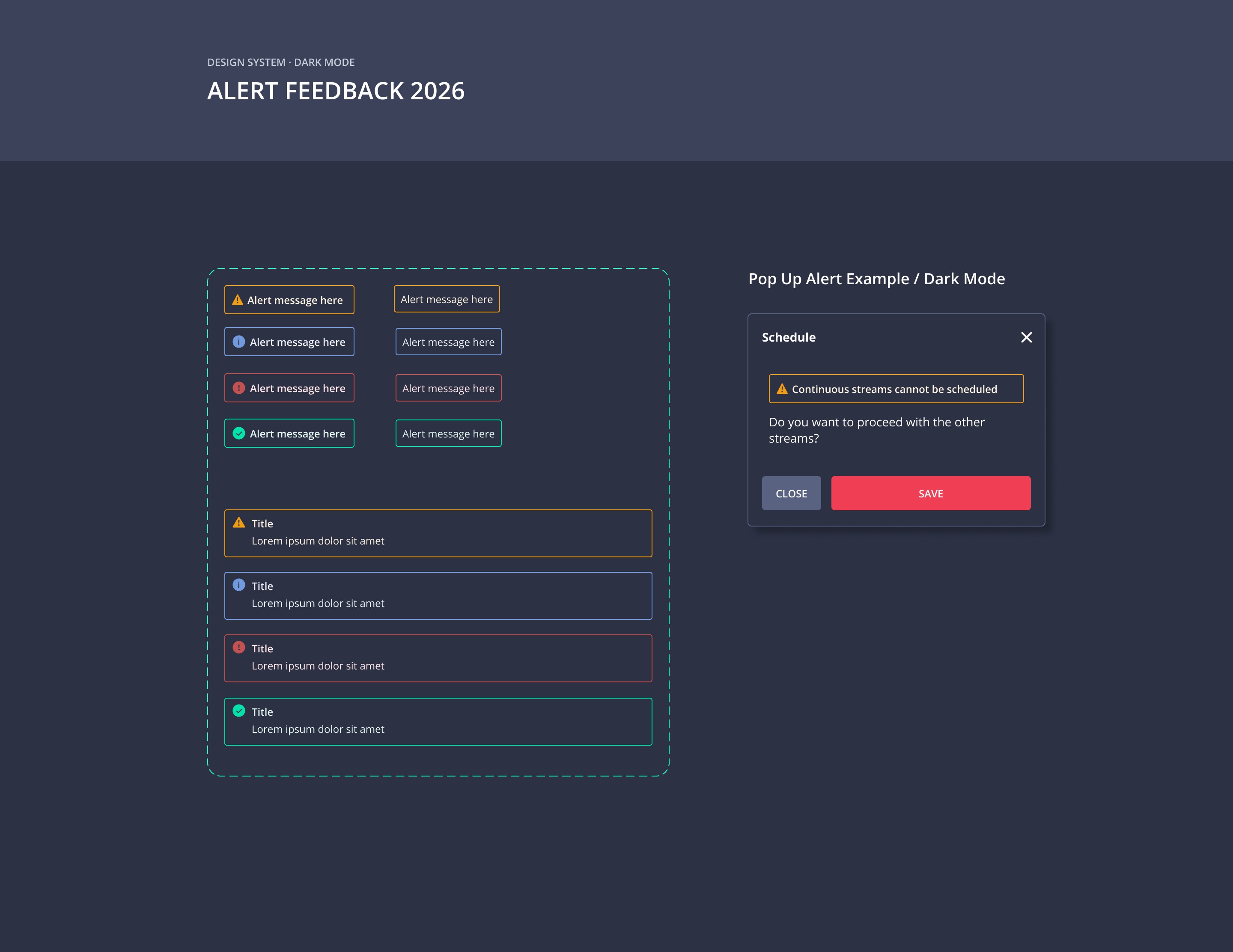
The product also lacked a cohesive design system, so before building new functionality, I audited the platform and defined scalable patterns with developers so the new capability would feel native rather than bolted on.


Results
The release repositioned Grabyo around fast-turnaround, high-volume publishing, reduced reliance on third-party software.
Success was measured through increases in alternative aspect ratio outputs, and overall clip volume.
This work became Phase One of a broader initiative to make Grabyo the go-to platform for rapid social video workflows, paving the way for templated formats, automated captions, and further AI-assisted tools.
Grabyo is a cloud-native platform for producing, distributing, and monetising live video, with built-in production, AI tools, and social publishing.
Grabyo is a cloud-native platform for producing, distributing, and monetising live video, with built-in production, AI tools, and social publishing.
Grabyo is a cloud-native platform for producing, distributing, and monetising live video, with built-in production, AI tools, and social publishing.
WORKSHOP
RESEARCH
STRATEGY
UX/UI DESIGN
USABILITY TESTING
WORKSHOP
RESEARCH
STRATEGY
UX/UI DESIGN
USABILITY TESTING
What I did
Senior Product Designer and Design Lead. I led the user experience for the fast track reframing, working closely with the product owner and engineering team from scoping through to general release. Also I led internal discovery, and ran an A/B test on the manual tracking experience.
The Challenge
When I joined Grabyo, social platforms had shifted toward vertical and square video, but Grabyo's workflow still reflected a horizontal-first paradigm. Clients were exporting clips, reframing them in external software such as Adobe, and re-uploading them before publishing, which was slow, fragmented, and skill-intensive.
The opportunity was to realign the product with where media consumption was heading.
Opportunity
Most content on the platform was short-form, where speed mattered without sacrificing broadcast-quality standards. Social media specialists needed a fast, reliable way to reframe clips, not a full editing suite. Since not all clients could afford the AI tracking service, manual tracking had to hold up just as well. And wherever AI handled tracking, users needed an easy way to review and correct any inaccuracies.
Fast-Track Reframing
The ambition was simple: to let users convert 16:9 clips into 9:16 or 1:1 formats directly within Grabyo and publish instantly, without downloading, editing externally, and re-uploading.
We structured the experience around one logic system: keyframes. AI auto-tracking and mouse tracking both generated editable keyframes, so advanced users could fine-tune output while less specialised users could export immediately. This also meant AI inaccuracies and manual keyframes could be reviewed and corrected the same way.
Fast-Track
The Challenge
The key challenge was balancing ease of use with professional control, for two different users: the expert video editor and the non-expert social media editor.
Since manual tracking was the primary way to reframe a clip for clients without AI tracking, I wanted to validate the core interaction before committing to it.
I proposed two solutions and ran an A/B test between them.
In the first, the user moved the video clip itself, like an object, within the aspect ratio frame, automatically dropping keyframes when the object was released.
In the second, the red aspect ratio frame worked as a pointer over the video to track movement, and the user could click on it to drop a keyframe.
The second option passed after comparing speed and overall experience.


Design System
The product also lacked a cohesive design system, so before building new functionality, I audited the platform and defined scalable patterns with developers so the new capability would feel native rather than bolted on.
Results
The release repositioned Grabyo around fast-turnaround, high-volume publishing, reduced reliance on third-party software.
Success was measured through increases in alternative aspect ratio outputs, and overall clip volume.
This work became Phase One of a broader initiative to make Grabyo the go-to platform for rapid social video workflows, paving the way for templated formats, automated captions, and further AI-assisted tools.